
Call us 800-488-4110 (Toll Free)



















GeoHECHMS greatly speeds up the creation, analysis, and review of stormwater models. It automates subbasin delineation, curve number (CN) computation using land use and soils maps, and lag time (time of concentration) computation. GeoHECHMS is a data wrapper to the industry-standard US Army Corps of Engineers HEC-HMS software using an AutoCAD compatible graphical user interface. Quickly compare different scenarios and alternatives, such as pre-development conditions with different post-development designs. Rapidly construct, design, analyze and compare detention and retention ponds. Both US and metric (SI) units are supported.
GeoHECHMS Automated Stormwater Modeling Software (video 2:12 minutes)
GeoHECHMS is an AutoCAD, MicroStation and ESRI ArcGIS compatible interactive 2D/3D graphical user interface data wrapper to the US Army Corps of Engineers HEC-HMS stormwater software.
Import existing Army Corps HEC-HMS models and quickly georeference them to real-world maps using included georeferencing tools.
Work with multiple HEC-HMS projects simultaneously using the Multiple Document Interface (MDI), including copying and pasting of stormwater structures and other data between HEC-HMS projects.
Interact graphically with all HEC-HMS model elements. Effortlessly create and edit subbasins, detention ponds, routing reaches and other model elements by clicking and dragging. Uncomplicated dialog boxes allow easy data entry and review.
Correct mistakes easily with unlimited Undo and Redo capability. Experiment with different engineering and management decisions. Rollback changes one at a time or select a group of changes from a visual selection list.
Toll-free 24-hour 7-day a week unlimited technical support by experienced HEC-HMS stormwater modelers is just a phone call away. Quickly resolve your stormwater modeling questions and complete your engineering project—our skilled, professional engineers are here to assist you.
The workflow is similar to what we were used to before, but with CivilGEO it’s much more refined and more centric into one package…
GeoHECHMS allows me to bring in all the information I need, and greatly speeds things up…
Watch video testimonials to hear stories from other clients.
Interact graphically with all HEC-HMS model elements. Effortlessly create and edit subbasins, detention ponds, routing reaches and other model elements by clicking and dragging. Uncomplicated dialog boxes allow easy data entry and review.
Correct mistakes easily with unlimited Undo and Redo capability. Experiment with different engineering and management decisions. Rollback changes one at a time or select a group of changes from a visual selection list.
Extend your engineering team with unlimited 24/7 toll-free support from experienced water resource engineers—not just software technicians. Get expert guidance on complex hydraulic problems, modeling challenges, and design questions whenever you need it, at no additional cost.
Speed up stormwater projects with automated workflows to automatically delineate watersheds, compute curve numbers (CN), compute TOC & lag times, compute % impervious, assign design storms, size detention ponds, and generate engineering reports.
Load, edit, and run multiple HEC-HMS models simultaneously. The Multiple Document Interface (MDI) allows easy copying and pasting between models, quick comparisons of input data and results between scenarios, and other modeling efficiencies. Models can be displayed in tiled windows or tabbed views, providing greater productivity.
Integrate HEC-HMS directly with AutoCAD (including AutoCAD Civil 3D), Bentley MicroStation and ESRI ArcGIS terrain data. Export completed HEC-HMS models and results to AutoCAD, MicroStation and ArcGIS.
Delineate subbasins and watersheds from 3D digital elevation terrain data. Utilize AutoCAD Civil 3D surfaces, MicroStation surfaces, contours, TINs, DTMs, DEMs, survey points, LiDAR, and other external digital elevation terrain data.
Quickly size and design detention and retention ponds for different design storms and engineering criteria. Develop outlet structures for different scenarios, considering both water quality and design storm requirements.
Develop and compute HEC-HMS stormwater results directly within the software, no external data processing required. Read and write standard US Army Corps HEC-HMS data files, ready for regulatory agency submittal. In addition, HEC-1 models can be imported and updated to HEC-HMS.
Compare different engineering models, such as existing and proposed development, different detention pond designs and more. This allows stakeholders to evaluate alternatives, allowing you to consider more innovative and environmentally sensitive designs.
Comprehensive, easy-to-read input data and output analysis reports are automatically generated using provided drainage report templates. Reports can be customized to meet reviewing agency requirements.
Automatically compute the longest flow path, assign sheet flow, shallow concentrated flow and channel flow segments. Use included land use mapping and soil mapping to automatically compute composite curve numbers (CN) in minutes.
Reduce time wasted with imprecise data. Easily integrate field collected data in varying formats along with CAD and GIS data to update the HEC-HMS model to accurately reflect field conditions.
To improve productivity, the HEC‑HMS stormwater results computed within GeoHECHMS will seamlessly migrate to HEC-RAS. This greatly increases the speed at which users can perform HEC‑RAS flood studies, design bridge and culvert roadway crossings, compute dam failures, and complete stream restoration and alignment projects.
Blend Google or Microsoft Bing online maps and high-resolution aerial imagery files directly into the HEC-HMS model. Quickly and easily georeference existing HEC-HMS models to background maps, AutoCAD and MicroStation drawings, or ArcGIS map data.
Integrated stormwater design tools offer more efficient ways to create and analyze a stormwater project, size and design detention ponds, analyze dam failures and more. Update subbasin catchment boundaries dynamically as terrain data is changed. Quickly define detention ponds and outlet structures using specialized stormwater tools.
Shift seamlessly between 2D and 3D viewing perspectives to clearly identify modeling issues and make changes. Freely rotate, pan, zoom, and fly through the model to any perspective to review subbasins, detention ponds, routing reaches and more.
Create stunning visualizations directly from the software of different design alternatives to help better understand the impact of the design on the community and the surrounding environment. Publish the HEC‑HMS model directly to Google Earth for even greater visualization and understanding of the project.
Complete land use coverage is provided for the USA, Canada, Europe, Australia and many other parts of the world. For the USA, land coverage data is provided at a 100 x 100-foot grid cell size. This makes it extremely easy to compute composite curve numbers, time of concentrations, lag times and more.
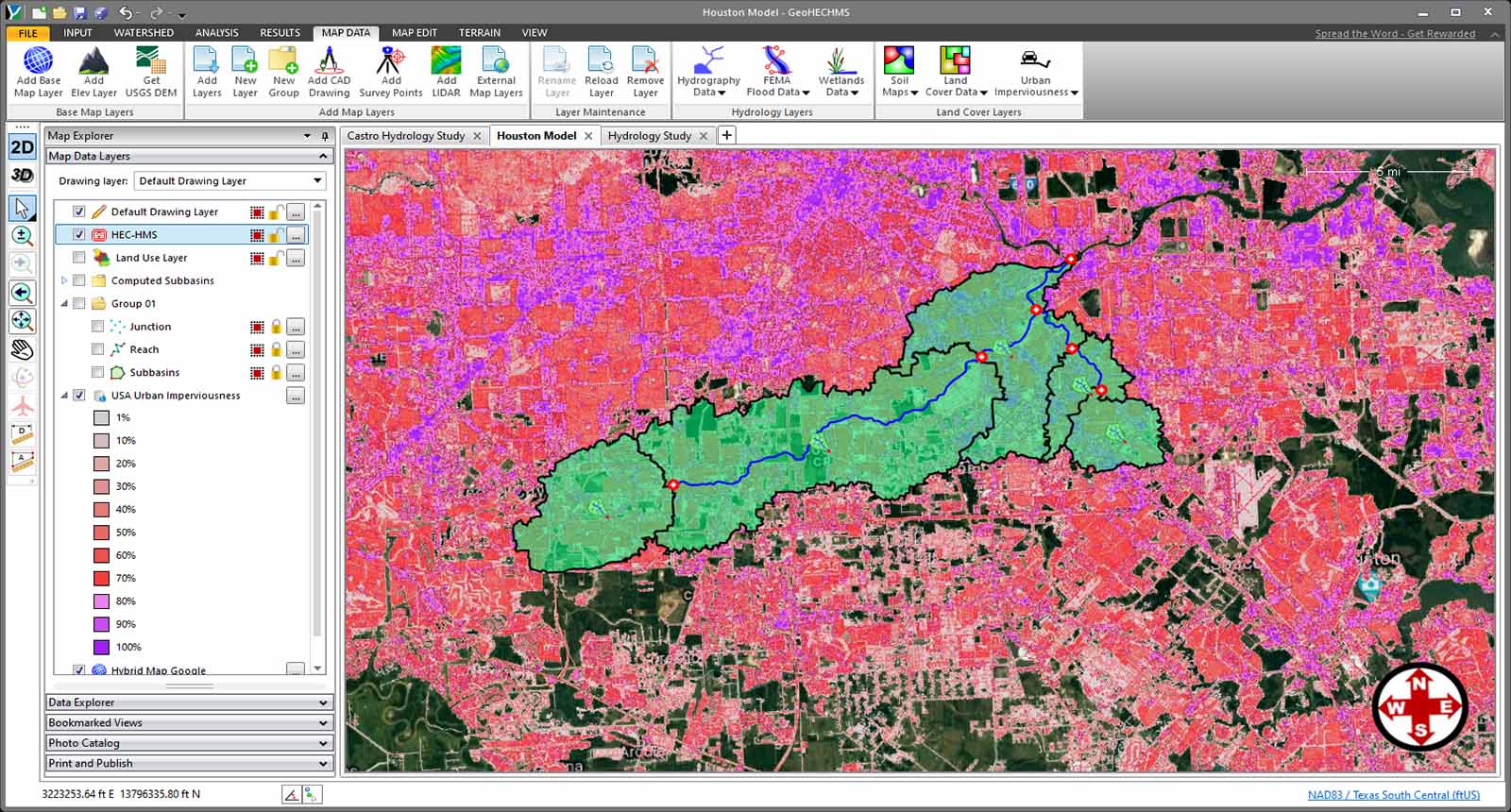
Complete percent imperviousness coverage is provided for the USA at an approximate 100 x 100-foot grid cell size. This allows a more accurate stormwater model to be developed, allowing urbanization effects to be directly incorporated into the stormwater model.
Utilize world-wide high-resolution 3D digital elevation terrain data from map services for automated watershed delineation, computation of time of concentration and lag time. Utilize web-based mapping services for aerial orthophotos, FEMA flood maps, watershed delineation, river centerline alignment, and more.
Extract HEC-HMS routing reach cross sections from 3D digital elevation terrain data. Utilize AutoCAD Civil 3D surfaces, MicroStation surfaces, contours, TINs, DTMs, DEMs, survey points, LiDAR, and other external digital elevation terrain data. Automatically convert the extracted cross section to an equivalent 8-point cross section.
For large models with numerous subbasins, routing reaches, junctions and other stormwater elements, the software will automatically name the elements based upon user-specified guidelines. The elements are named sequentially, by routing distance or incrementally.
Handle larger projects with powerful 64-bit, multi-core, parallel processing support. This improves performance and stability for memory-intensive tasks—including running HEC-HMS simulations faster.
Rapidly compute SCS time of concentration and lag time using flow segments of sheet flow, shallow concentrated flow and channel flow. The software will automatically compute overland flow lengths, slopes and travel times based upon digital terrain surfaces and land use coverages.
The software will automatically determine the design storm and corresponding precipitation based upon the project location anywhere within the USA, Canada, Austria, and Germany. It will determine the design rainfall for the 1, 2, 5, 10, 25, 50, 100, and 500-year storms by querying the Precipitation Frequency Data Server based on the project location.
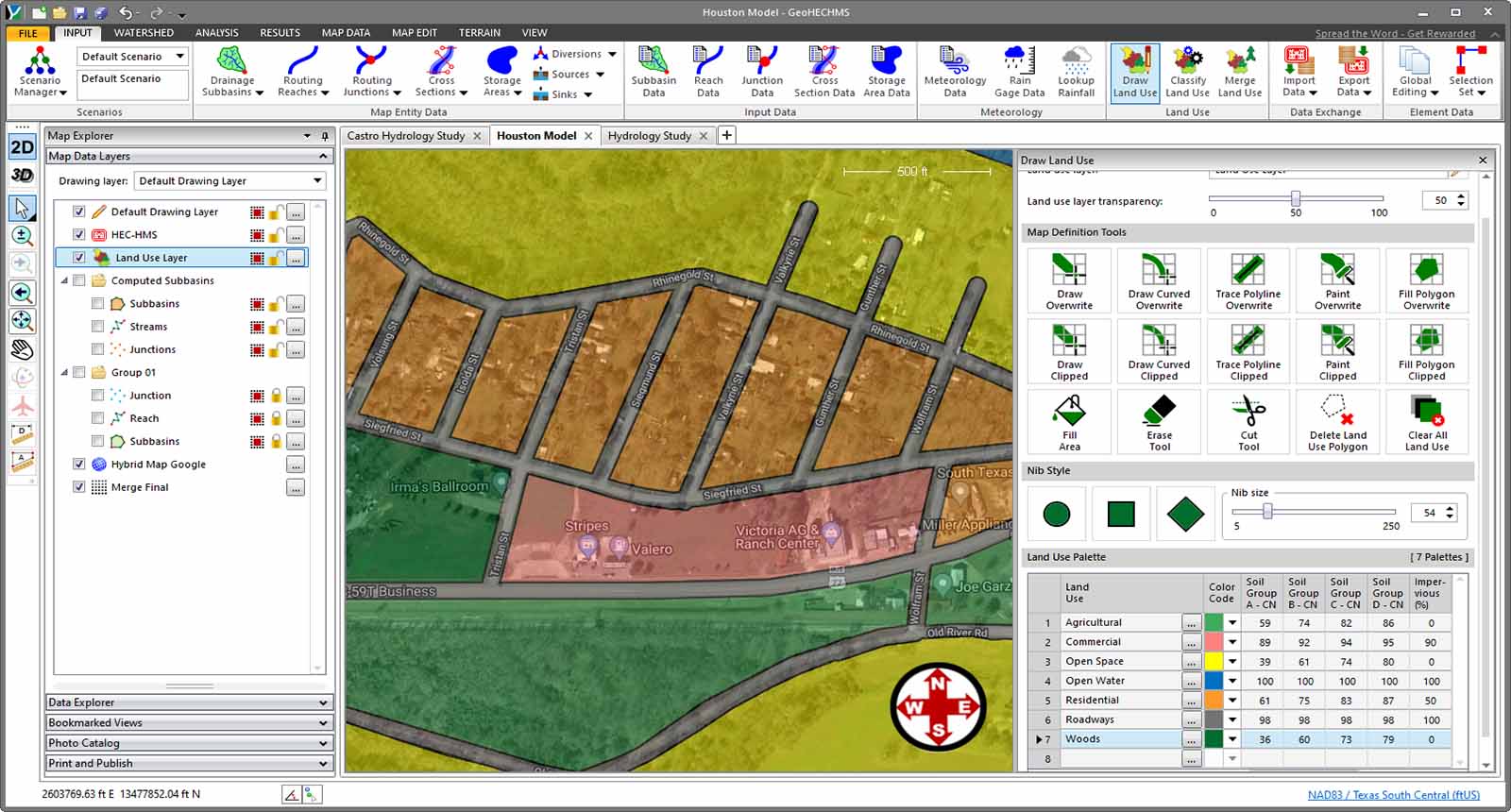
Quickly compute composite SCS curve numbers (CN), Green Ampt and percent imperviousness based upon aerial mapping, GIS polygon land use, or just by painting regions of land use on the screen. The software will automatically compute a weighted average of the different land uses and assign it to each subbasin.
| Capability | GeoHECHMS | HEC-HMS | PondPack | StormCAD | WMS | Hydrology Studio |
|---|---|---|---|---|---|---|
| Automated TOC & CN Calculations | ||||||
| Automated TOC & Lag Time Calculations | ||||||
| Automated CN & Green Ampt Calculations | ||||||
| Automated Watershed Delineation | ||||||
| Powerful Report Generation | Limited | Limited | ||||
| Automated Design Storm Assignment | ||||||
| Built-In Elevation Data Sources | Limited | |||||
| Integrated Terrain Modeling | Limited | |||||
| Automated GIS Mapping Functions | Limited | |||||
| Integrated 2D / 3D Viewing & Editing | ||||||
| CAD & GIS Integration | Limited | Limited | Limited | Limited | ||
| 24×7 Toll Free Technical Support | Limited | |||||
| Free Onboard Training | ||||||
| Free Engineering Project Assistance |
The workflow is similar to what we were used to before, but with CivilGEO it’s much more refined and more centric into one package…
GeoHECHMS allows me to bring in all the information I need, and greatly speeds things up…
Watch video testimonials to hear stories from other clients.
Water resource experts and leads at CEC, Matt Gramza and Steve Casey, sat down with CivilGEO’s engineering director, Chris Maeder…
The compatibility of GeoHECRAS with GIS and other applications like PCSWMM makes the pre- and post-processing aspects….
The use of GeoHECRAS for floodplain delineation has resulted in significant time and cost savings as well. Skupien notes that….
We use cookies to give you the best online experience. By agreeing you accept the use of cookies in accordance with our cookie policy.

When you visit any web site, it may store or retrieve information on your browser, mostly in the form of cookies. Control your personal Cookie Services here.
 EN EN
EN EN  FR
FR  DE
DE  IT
IT  ES
ES  CN
CN  PL
PL  ID EN EN FR
DE
IT
ES
CN
PL
ID
ID EN EN FR
DE
IT
ES
CN
PL
ID